
Pak Sim Data — Check
SIM Details in Pakistan (2026)
Every SIM card sold in Pakistan is linked to a real person's identity. That connection between your phone number and your personal information is what people call Pak Sim Data. Most people never think about it until something goes wrong.
Maybe you got a call from a stranger saying a SIM is registered in your name. Maybe you want to check how many SIMs are active on your CNIC. Or maybe you just bought a new SIM and want to confirm your details are correct.
Pak Sim Data Check
Enter mobile number or CNIC to verify owner details
What Is Pak Sim Data?
Pak Sim Data refers to the registration record that connects a SIM card to its owner in Pakistan. When you buy a SIM from any network like Jazz, Telenor, Ufone, Zong or SCOM your 13-digit CNIC number, your name and your biometric fingerprint are stored in a government database.
This database is managed jointly by two government bodies:
- PTA (Pakistan Telecommunication Authority): regulates all mobile networks in Pakistan
- NADRA (National Database and Registration Authority): verifies the identity of every SIM buyer through biometric data
So when someone talks about Pak Sim Data they are simply referring to the ownership record of a SIM card who bought it, under which CNIC and on which network. You can check full sim owner details through verified online tools.
Why You Should Check Your SIM Data
Most people assume their SIM data is fine because they registered it themselves. But that is not always the case.
Here is something many Pakistanis do not know someone else can register a SIM using a copy of your CNIC without your knowledge. This happens more often than you think at fake biometric centers, through dishonest franchise employees, or through stolen CNIC copies.
There are a few important reasons to check your Pak Sim Data at least once every few months:
- To confirm no extra SIM is registered under your name without your permission
- To make sure your own SIM details are showing correctly
- To avoid legal trouble if a registered SIM in your name is used for fraud
- To stay within PTA's SIM limit which is a maximum of 5 SIMs per CNIC across all networks
If you have never checked your SIM data before now is a good time to start.
How to Check Pak Sim Data in 2026
The good news is that the Pak Sim Data check is completely free. You do not need to visit any office or pay any fee. Here are three methods.
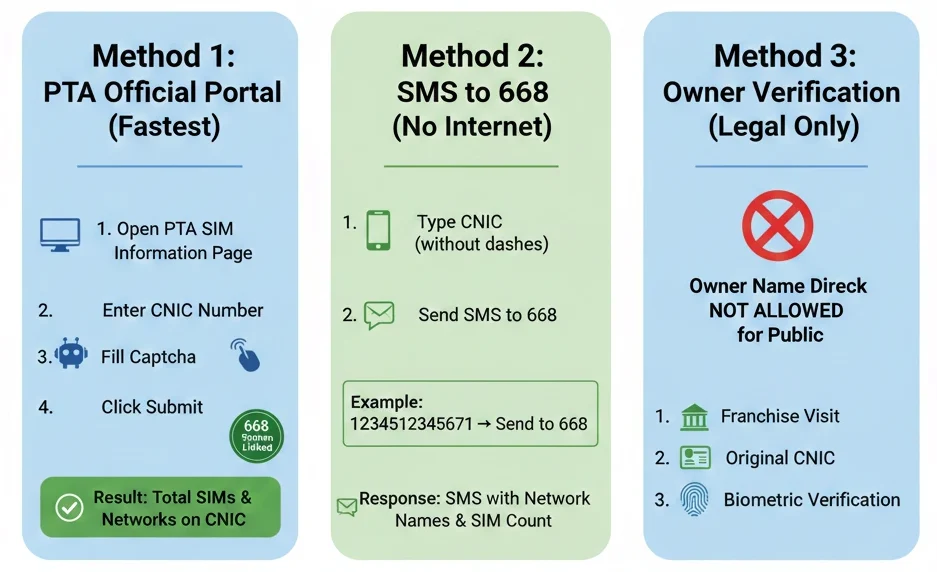
Method 1 SMS to 668 (Fastest Way)
This is the easiest method. You only need your phone and your CNIC number.
- 1 Open your SMS app
- 2 Type your 13-digit CNIC number (no dashes, no spaces) Example: 3520112345678
- 3 Send it to 668
Within a minute, you will receive an SMS listing all SIM numbers currently registered under your CNIC along with their network names. This service works on all networks and is 100% free.
Method 2 PTA Official Website
The PTA has a free online portal where you can check your Pak Sim Data from any browser.
- 1 Go to pta.gov.pk
- 2 Look for "SIM Information System" in the menu
- 3 Enter your 13-digit CNIC number
- 4 Complete the captcha verification
- 5 Press Submit
The results will show you a full list of SIMs registered under your CNIC including the network and status of each number.
This is the most reliable Pak Sim Data website to use. Always avoid third-party websites that ask for your CNIC they are not official and could misuse your information.
Method 3 Visit a Network Franchise
If you prefer face-to-face help, you can walk into any authorized franchise of your mobile network. Bring your original CNIC not a photocopy.
The staff can check all SIM details linked to your CNIC and also help you block any SIM you did not register yourself. This method is especially useful for senior citizens or people who are not comfortable with online tools.
Always avoid third-party websites that ask for your CNIC. Only use your CNIC on the official PTA portal at pta.gov.pk or via the SMS method to 668.
Network Codes at a Glance
Every mobile network in Pakistan has its own short codes for SIM-related services. Here is a quick reference table:
| Network | Check Your Number | Balance Check | Customer Care |
|---|---|---|---|
| Jazz | *99# | *111# | 111 |
| Telenor | *345# | *444# | 345 |
| Ufone | *999# | *124# | 333 |
| Zong | *100# | *222# | 310 |
| SCOM | *1# | *888# | 1219 |
For full Pak Sim Data details it meaning all SIMs under your CNIC that use the 668 SMS method or the PTA website. These short codes only help with individual SIM-specific tasks.
SIM Registration Rules
PTA updates its policies regularly to reduce mobile fraud and protect citizens. Here are the most important rules that apply right now:
- 1 Biometric Verification is Mandatory Every new SIM must go through a thumbprint scan at an authorized franchise. No biometric, no activation. This rule has been in place for several years and is strictly enforced.
- 2 Maximum 5 SIMs Per CNIC You cannot have more than 5 active SIMs registered under one CNIC across all networks combined. If you already have 5 and want a new one, you must first deactivate an existing SIM.
- 3 Only Authorized Franchises Can Issue SIMs Buying a SIM from a roadside vendor or an unauthorized shop is illegal. These SIMs are often registered using stolen CNIC data, which can cause serious legal issues for the real CNIC owner.
- 4 SIM Re-verification Drives PTA occasionally runs national campaigns asking citizens to re-verify their SIMs. If a SIM fails re-verification, it can be blocked. Always keep your CNIC active and updated with NADRA to avoid this problem.
How to Keep Your SIM Data Safe from Fraud
Pakistan sees thousands of SIM-related fraud cases every year. Most of them happen because people are unaware of simple safety steps.
Never hand over a photocopy of your CNIC without knowing exactly why it is needed. Many SIM fraud cases start with a carelessly shared CNIC copy.
In a SIM Swap fraud, someone convinces your network to transfer your phone number to a new SIM they control. Once they have your number, they can receive your bank OTP codes and empty your account. If your phone suddenly loses all signal for no reason, call your network immediately and visit the nearest franchise.
There are many fake websites claiming to offer free Pak Sim Data check services. Some ask for your CNIC and then misuse it. Always use pta.gov.pk or the 668 SMS method only.
You can request your network to add a SIM lock to your number. This means any SIM replacement request must go through extra verification steps, making it much harder for fraudsters to swap your SIM.
What to Do If a Fake SIM Is Registered in Your Name
Finding a SIM on your CNIC that you never bought is a serious situation. Here is exactly what to do:
- 1 Call PTA helpline Dial 0800-55055 (toll-free, available 24/7). Report the unauthorized SIM and request its blocking.
- 2 Visit the network franchise Go to the franchise of the network that issued the fake SIM. Bring your original CNIC and ask them to block the number immediately.
- 3 File a complaint on PTA's website Go to pta.gov.pk, open the Consumer Support section, and submit a written complaint with your CNIC number and the unauthorized SIM details.
- 4 Report to FIA Cybercrime If the SIM was used for fraud, harassment, or financial crime, report it to Pakistan's Federal Investigation Agency at nr3c.gov.pk or call their helpline at 9911.
Conclusion
Pak SIM Data is a sensitive topic where awareness is more important than just information. In 2026, both Google and PTA are promoting legal, transparent and user-safe information.
If you want to keep your SIMs secure:
- Use only official methods
- Avoid fake websites
- Follow PTA rules
By doing so, you can protect your digital identity and stay safe from any legal issues.
Pak Sim Data is the registration information tied to a SIM card in Pakistan. It includes the CNIC number of the owner, their name, the network name, and the date of registration. This data is stored in PTA and NADRA's system and is linked to every active SIM in the country.
You can check it for free in two ways. First, send your 13-digit CNIC number as an SMS to 668 from any network. Second, visit the official pta.gov.pk website and use the SIM Information System tool. Both methods show all SIMs registered under your CNIC at no cost.
No. Pak Sim Data is private and protected. You can only check the SIMs registered under your own CNIC. Checking another person's SIM registration data without their consent is not allowed and can be considered a privacy violation under Pakistani law.
According to PTA rules in 2026, a maximum of 5 SIM cards can be registered under a single CNIC at the same time across all mobile networks. This limit covers Jazz, Telenor, Ufone, Zong, and SCOM combined.
Contact PTA immediately on their toll-free number 0800-55055 and request the SIM to be blocked. Also visit the franchise of the network that issued the SIM and carry your original CNIC. If the SIM was used for any illegal activity, file a report with FIA Cybercrime at nr3c.gov.pk.