
CNIC SIM Check: See Every SIM Registered on Your ID Card
Most people in Pakistan never check how many SIMs are linked to their national ID card. They guess one or two but the real number is often higher. That extra SIM you didn't buy? Someone else may be using it for fraud, scam calls or fake bank accounts and the law treats that SIM as yours.
A CNIC SIM Check takes less than a minute and protects you from years of trouble. You Can check the official PTA SIM Information System methods, how biometric SIM verification works, what the SIM database Pakistan keeps about you, and the steps for SIM verification Pakistan PTA approves.
National Identity Card
35202-XXXXXXX-X
SIMs Linked to This CNIC
Registered SIMs
4 Found-
📱KnownJazz0300-XXXXXXX
-
📱KnownZong0314-XXXXXXX
-
📱KnownTelenor0345-XXXXXXX
-
⚠️UnknownUfone0333-XXXXXXX
What Is a CNIC SIM Check?
A CNIC SIM Check is a way to find out how many mobile SIMs are registered on your national ID card. It tells you which networks have issued SIMs in your name like Jazz, Zong, Telenor, Ufone and SCOM.
The check works because PTA (Pakistan Telecommunication Authority) keeps a central record of every active SIM in the country. This record is part of the PTA SIM Information System it is also called the Subscriber Verification Management System (SVMS). It is connected to NADRA, which means every SIM is linked to a real person through their fingerprint.
So when you do a CNIC SIM check, you are basically asking PTA: "Please show me every SIM that has my CNIC attached to it." The system replies with a count for each network.
This system became part of daily life after PTA made biometric SIM verification compulsory in 2014. Today, you cannot get a new SIM in Pakistan without putting your finger on a NADRA scanner. From 2026 face verification has also been added on top of fingerprints, making the process even stronger.
Why a CNIC SIM Check Is Important for Every Pakistani
Many people skip this check because they feel it's not needed. That feeling changes the day they get a call from the police about a SIM they never bought.
Here are the reasons why this check matters.
You Are Legally Responsible for Every SIM on Your CNIC
Pakistani law is very clear on this point. If a SIM is registered in your name you are answerable for every call, message and transaction made from it even if you never touched that SIM in your life.
If a fraud is done from a SIM linked to your CNIC the case starts with you. Proving your innocence in court can take years and cost a serious amount of money.
Protection Against Identity Theft
Criminals love stolen CNIC copies. They use them to open fake bank accounts, get loans and commit online fraud. A SIM activated in your name is often the first step in this chain.
Stopping Bank and JazzCash Fraud
Most bank apps in Pakistan send a one-time password (OTP) to your phone. If a fraudster controls a SIM linked to your CNIC, they can reset passwords, drain JazzCash and Easypaisa wallets and approve transfers all without you knowing.
PTA SIM Limits Can Affect Your Real SIM
PTA allows a maximum of 5 voice SIMs and 3 data-only SIMs on a single CNIC (8 in total). The 5-SIM voice limit is the combined count across all networks.
If criminals load extra SIMs on your CNIC and the count crosses the limit PTA's system can automatically block one of your SIMs and it might be your real number, not the fake one.
How Many SIMs Are Allowed on One CNIC?
| Type of SIM | Maximum Allowed Per CNIC |
|---|---|
| Voice SIMs (Jazz, Zong, Telenor, Ufone, SCO combined) | 5 |
| Data-only SIMs (for MBB devices, tablets) | 3 |
| Total Active Connections | 8 |
You can split your 5 voice SIMs in any mix for example, two Jazz, one Zong, one Telenor and one Ufone. The system only cares about the total. Once you cross the limit no operator can issue you a new SIM until one of the old ones is deactivated.
The 3 Official Methods for CNIC SIM Check
There are three trusted ways to check SIMs on CNIC. All of them are free and all of them are approved by PTA.
| Method | What It Shows | Cost | Best For |
|---|---|---|---|
| SMS to 668 | SIM count per network | Around Rs. 2 + tax | Quick check from any phone |
| PTA Portal (cnic.sims.pk) | Full record with details | Free | Printable proof, legal use |
| Operator codes / apps | Details for one network | Free | Single-network check |
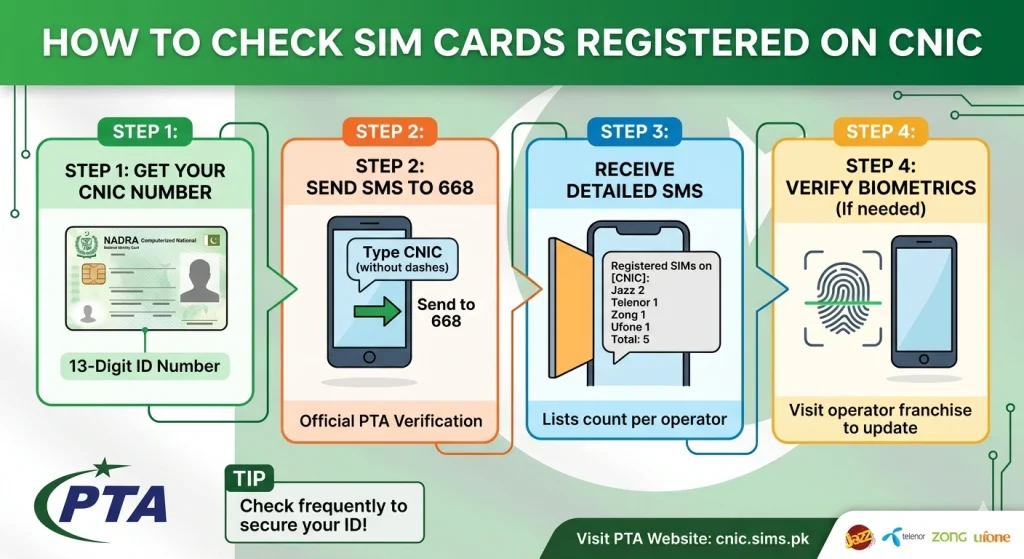
Method 1 — Send Your CNIC to 668 (SMS)
This is the fastest and most popular method. It works on any mobile phone, even old keypad phones and you don't need the internet.
How to do it:
- Open your messages app.
- Type your 13-digit CNIC number with no dashes and no spaces (example: 3520112345678).
- Send it to 668.
- Wait a few seconds. You will get a reply showing how many SIMs are registered against your CNIC, listed by network.
Your reply will look something like this:
The 668 service is run by PTA together with all the operators. It pulls real-time data, so the result is the most up-to-date picture of your SIM record.
One thing to remember: 668 only shows the count, not the actual phone numbers. To find the exact numbers, you'll need to visit the operator franchise (more on that later).
Method 2 — Use the Free PTA Portal (cnic.sims.pk)
If you want a more detailed record and a printable copy you can use for legal matters the PTA portal is the better choice.
Steps:
- Open any browser on your phone or computer.
- Go to cnic.sims.pk.
- Enter your 13-digit CNIC number.
- Complete the simple captcha (the small puzzle that proves you are not a robot).
- The portal will show a clean breakdown of your SIMs by operator, often with activation dates.
The big advantage of this method is that you can print or screenshot the result. Banks, courts, and police stations accept this printout as official proof when you file a case about an unknown SIM.
Method 3 — Operator Codes for Quick Self-Check
Each network has its own short code that lets you check details from your own SIM. These codes are useful when you only want to confirm one specific SIM, not the whole CNIC.
| Network | Self-Check Code | Helpline |
|---|---|---|
| Jazz / Mobilink | Dial *44461# or send CNIC to 6001 | 111 |
| Zong | Dial *6665# | 310 |
| Telenor | Dial *345# (or send blank SMS to 7751 for biometric status) | 345 |
| Ufone | Dial *336# and choose option 1 | 333 |
| SCO | Visit nearest SCO franchise | — |
These codes work only from a SIM of that network. They don't replace the 668 check — they add to it.
What to Do If You Find a SIM You Didn't Buy
Step 1 — Note Down the Operator
Look at your 668 reply or the PTA portal result. The extra SIM will be under a specific network. That tells you which company you need to contact.
Step 2 — Visit the Operator's Franchise (Not Just Call)
Phone calls work for some things, but blocking an unknown SIM almost always needs a personal visit. Take your original CNIC with you. Photocopies are not accepted.
When you reach the franchise, ask for "SIM Disowning" or "Unauthorized SIM Blocking." The staff will know exactly what you mean. They will then run a fresh biometric check (fingerprint) to confirm it's really you.
Step 3 — Get a Reference Number
After the request is filed, the staff will give you a complaint or reference number. Save it. You will need it if anything goes wrong later.
Operators are required to block the unauthorized SIM within 24 to 48 hours.
Step 4 — Confirm the Removal
Wait two days, then send your CNIC to 668 again. The count should now be lower. If it's not, go back to the franchise with your reference number and follow up.
Step 5 — File a PTA Complaint If Needed
If the operator delays or refuses to act, file a formal complaint at complaint.pta.gov.pk. PTA usually responds within a few working days.
Step 6 — Report to FIA Cybercrime If Fraud Already Happened
If the unknown SIM was already used for fraud, fake bank accounts, scam calls, money taken from your wallet, go straight to complaint.fia.gov.pk or visit the nearest FIA Cybercrime office. Take all your evidence.
How Do SIMs Get Registered on Your CNIC Without You Knowing?
There are a few common ways:
Some workers at small retail shops scan your finger one extra time when you buy a SIM. That extra scan is then used to activate another SIM you never asked for.
You give a photocopy of your CNIC at a hotel, hospital, school, or property dealer's office. That copy can fall into the wrong hands.
A lost ID card can be used in many ways, including fake SIM activation, before you even report it.
Past data leaks have left millions of CNIC details on shady websites. Criminals buy this data and use it for SIM fraud.
PTA has tightened the rules a lot. From 2026, face verification is required along with fingerprint. The minimum gap between two new SIM activations on the same CNIC has been raised to seven days. And PTA has blocked over a thousand fake "SIM data" websites.
CNIC SIM Check for Parents and Elderly Family Members
Older people, especially elderly women in villages, are the easiest targets for SIM fraud. They rarely check their records, they often hand over CNIC copies without thinking, and they may not even know what biometric verification is.
If you have parents or grandparents at home, take 10 minutes once a month and run a 668 check on their CNIC from their own phone. If they don't use a phone, do it from yours but using their CNIC (you can do this for direct family using their phone or with their permission).
Make a small chart at home with everyone's CNIC and the number of SIMs each person actually owns. Update it every month after the 668 check. This one habit can save your whole family from years of legal trouble.
Fake SIM Database Websites
If you search online, you will find many sites promising to give you the name and address of any SIM owner in seconds. Some look very professional. Some have apps on the Play Store.
Almost all of them are fake.
Here's what they actually do:
- Show made-up names and addresses to look real.
- Save your CNIC and number for future fraud.
- Install spyware on your phone through fake APK downloads.
- Charge money for results that have no value.
PTA has blocked more than 1,300 such websites. Using them is also a crime under PECA 2016 you can be punished even as a user, not just the website owner.
The only safe answer is the official path: 668, cnic.sims.pk, and your operator's own channels.
Final Thoughts
A CNIC SIM Check is one of the smallest things you can do for your safety and one of the most useful. It takes less than a minute. It costs almost nothing. And it can save you from problems that take years to fix.
The system PTA has built is solid. Biometric verification, the 668 service, the cnic.sims.pk portal, and the operator codes all work together to give every Pakistani a clear view of their own SIM record. The only thing missing is the habit of using it.
Frequently Asked Questions
The cnic.sims.pk portal is fully free. The 668 SMS service costs only standard SMS rate (about Rs. 2). Both are official PTA methods.
Just send your 13-digit CNIC (no dashes) to 668 from any mobile phone. You will get a reply within seconds showing the count for each network. No internet needed.
The only way to know is to check. Run the 668 SMS now. Compare the count with the SIMs you actually own. Any extra is unauthorized.
Visit the relevant operator's franchise with your original CNIC. Ask for "SIM Disowning," complete the biometric check, and get a reference number. The block usually happens within 24 to 48 hours.
Insert that SIM in your phone. Type MNP in the messages app and send it to 667. You will get a reply with the registered owner's name and a partly hidden CNIC.