
Check Jazz SIM Owner Details
in Pakistan (2026)
Thousands of people in Pakistan search for this every single day. Maybe you bought a used phone and found a SIM inside. Maybe a family member is using a number and you want to confirm the registration. Or perhaps you just want to make sure your own SIM is registered correctly under your CNIC.
Whatever the reason for checking Jazz SIM owner details it is free, and takes only a few minutes. This guide covers every working method available in 2026, explains what information you can actually see and answers the most common questions people have about Jazz SIM verification in Pakistan.
Jazz SIM Owner Details Check
Enter mobile number or CNIC to continue to PTA
Why Checking Jazz SIM Owner Details Matters
Pakistan has strict SIM registration rules under PTA (Pakistan Telecommunication Authority) guidelines. Every SIM card sold in the country must be registered under a valid CNIC. This rule exists to reduce fraud, protect users and keep the telecom system accountable.
Here is why people commonly need to check their Jazz SIM number owner details:
- Verification after purchase: You bought a second-hand phone and want to confirm the SIM is registered to you or check who owns it.
- SIM misuse concerns: You received a call from an unknown Jazz number and want to check if it is legitimate.
- Personal record check: You want to see how many SIMs are currently registered under your CNIC.
- Reconnecting an old number: You want to activate an old SIM and need to confirm the registration details first.
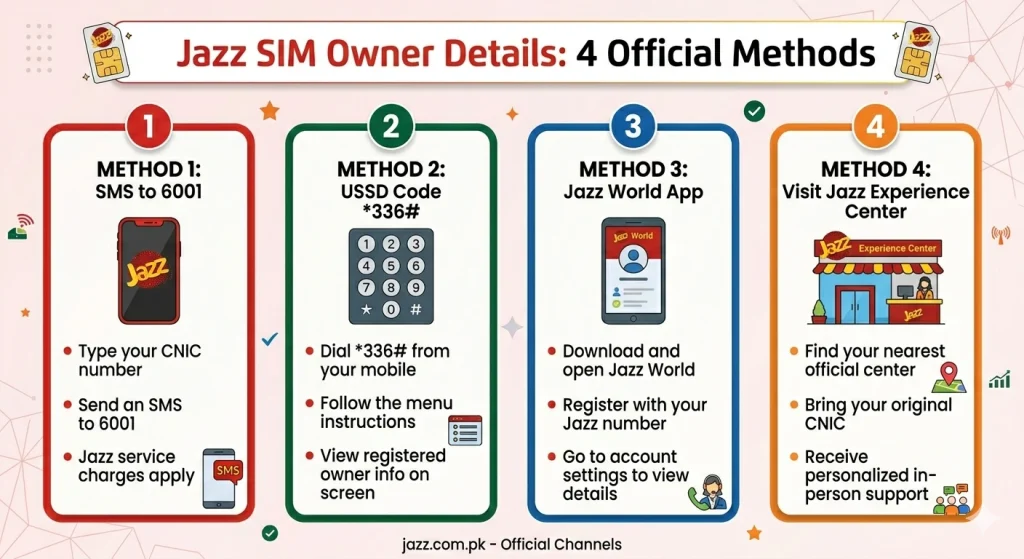
How to Check Jazz SIM Owner Details – 4 Working Methods
There are four reliable ways to check Jazz SIM owner details in Pakistan. Others require a short call. Pick the one that works best for your situation. If you are on a different network you can also check Ufone SIM owner details or view Minahil SIM details using the same process on their respective pages.
Jazz World App
The Jazz World app is the official self-care app from Jazz. It is available for free on both Android and iOS devices. This is the easiest way to check your Jazz SIM information directly from your smartphone.
- Download the Jazz World app from Google Play Store or Apple App Store.
- Open the app and sign in using your Jazz number.
- Go to My Account or Profile section.
- Your registered name, CNIC details and SIM registration status will be visible there.
Jazz Official Website (Self-Care Portal)
If you prefer using a browser on your computer or phone you can also check Jazz SIM owner details online through the official Jazz Self-Care portal.
- Open your browser and go to jazz.com.pk.
- Click on Self-Care or My Jazz at the top of the page.
- Log in with your Jazz number and OTP (a code sent to your number).
- Once logged in, go to your account profile to view your SIM registration details.
Dial *786# (USSD Code)
This is the quickest method for people who do not want to download an app or open a website. Just use your phone's dialer.
- Open your phone's dialer app.
- Dial *786# and press call.
- A menu will appear on your screen.
- Follow the on-screen options to check your SIM owner name and registration details.
| Detail | Info |
|---|---|
| USSD Code | *786# |
| Internet Required | No |
| Cost | Completely free |
| Works on | Any Jazz number |
Jazz Helpline 111
If you face any trouble with the above methods, or if you prefer speaking to someone directly, you can call the Jazz customer care helpline.
- Dial 111 from your Jazz number.
- Follow the IVR (voice menu) and select the option for SIM or account information.
- A customer service agent will guide you and confirm your Jazz SIM registration details after verifying your identity.
Can You Check Someone Else's Jazz SIM Owner Details?
This is one of the most searched questions around Jazz SIM information check and the honest answer is: not directly and not through official channels.
Jazz and PTA both protect user data under privacy regulations. No official platform will give you the full name and CNIC of a stranger based on their phone number alone.
However, if you are a business or have a legal concern — for example, reporting harassment or fraud — you can file a complaint with PTA through their official website at pta.gov.pk or contact the Federal Investigation Agency (FIA) Cybercrime Wing. These bodies can legally request telecom data for investigation purposes.
How to Keep Your Jazz SIM Details Safe
Once you know how to check Jazz SIM details it is equally important to know how to protect your information. SIM-related fraud is a growing problem in Pakistan.
Here are practical steps to keep your Jazz SIM registration details secure:
- Check your CNIC regularly: See how many SIMs are registered under your CNIC via the NADRA website or by dialing *668# (PTA's official SIM information service). If you see SIMs you do not recognize report them immediately.
- Never share your CNIC copy freely: Unverified shops or agents can misuse it to register new SIMs in your name without your knowledge.
- Lock your SIM with a PIN: Go to your phone settings and enable SIM card lock. This adds a layer of protection in case your phone is stolen.
- Report a lost or stolen SIM right away: Call Jazz helpline 111 immediately if your SIM is lost. Jazz can block the SIM to prevent misuse.
- Only use official Jazz channels: Avoid sharing your OTP with anyone, even if they claim to be a Jazz representative.
Final Thoughts
Checking your Jazz SIM owner details is straightforward once you know the right method. Whether you use the Jazz World app, the official website, the *786# code, or call helpline 111, each method gives you accurate information directly from Jazz's systems.
The most important thing to remember is to always use official channels. Do not trust random websites that offer to show SIM owner information for free — they are either inaccurate or unsafe.
Frequently Asked Questions (FAQs)
You can check Jazz SIM owner details online for free using the Jazz World app or by visiting jazz.com.pk and logging into your self-care account. Both methods are completely free and officially supported by Jazz.
The official Jazz SIM number check code is *786#. Dial it from your Jazz number and follow the menu options. It works without an internet connection and gives you SIM registration information within seconds.
According to PTA rules, a person can have a maximum of 5 SIMs registered under one CNIC across all mobile networks in Pakistan. This limit applies to all networks including Jazz, Telenor, Zong, and Ufone.
Officially, no. Jazz and PTA do not allow public access to another person's SIM registration details. If you have a legal reason to investigate a number, you can file a complaint with PTA or the FIA Cybercrime Wing for assistance.
Visit your nearest Jazz franchise or customer service center with your original CNIC. Jazz staff can help you transfer the SIM to your own name after verifying your identity. This is the only safe and legal way to update SIM registration details in Pakistan.