
Check Telenor SIM Owner Details
Online in Pakistan
Getting calls from unknown numbers is something almost every Telenor user deals with. Sometimes it is a random marketing call, sometimes a stranger who keeps calling back and sometimes you just want to know whose name a SIM is actually registered under before using it. If any of this sounds familiar you are in the right place. In this guide, I will explain you the ways to check Telenor SIM owner details, what information you can really see and what Pakistani law allows you to do.
Telenor SIM Owner Details Check
Enter mobile number or CNIC to continue to PTA
What Does "Telenor SIM Owner Details" Mean?
When someone talks about Telenor SIM owner details, they simply mean the registration information tied to a specific Telenor mobile number. Every SIM card in Pakistan is linked to a real person through their CNIC (Computerized National Identity Card). This rule was made by the Pakistan Telecommunication Authority (PTA) to stop criminals, fraudsters, and spam callers from hiding behind unknown numbers.
So when you check Telenor SIM owner details, you are basically asking the system: Who registered this SIM card, and how many other SIMs do they own?
The details usually include:
- The name of the person who owns the SIM
- The CNIC number linked to that SIM (partially hidden for privacy)
- The total number of SIMs registered on that same CNIC
- The network each SIM belongs to
Keep in mind that due to privacy laws you cannot see the full home address or complete CNIC of another person. PTA has made this rule to protect citizens from misuse of personal data.
Why People Want to Check Telenor Number Owner Details
There are many honest reasons why someone might want to check the details of a Telenor SIM. Let me share common ones.
Stopping unknown callers and scammers: Fake call scams have become very common in Pakistan. People pretend to be from banks, courier services or even the police. Checking the SIM registration details helps you know if the number is genuine.
Buying or selling a used phone: If you are buying a second-hand phone that still has a SIM in it you should check whose name the SIM is registered under before using it. This saves you from legal trouble later.
Checking your own SIMs: Many people do not realize they still have old SIMs registered in their name. Checking your Telenor SIM registration details helps you remove unused ones before someone else misuses them.
Helping family members: Parents often want to check what numbers their children are using or elderly family members ask for help in tracking a missed call from an important person.
Work and business reasons: Small business owners and online sellers often deal with customers over the phone. Verifying a Telenor number owner can save them from fake orders or prank customers.
Legal Rules You Must Know First
In Pakistan, checking full SIM owner details of another person is not fully public. PTA has limited this information to protect privacy. You can only check SIM owner details:
- SIMs registered on your own CNIC
- Partial information about other numbers (like masked CNIC)
Trying to get full personal information of someone else without their permission may break PECA (Prevention of Electronic Crimes Act) rules. Always use these methods for honest reasons, such as protecting yourself from fraud or checking your own records.
Methods to Check Telenor SIM Owner Details Online
Now let me walk you through the real methods that actually work. I have tested each one myself and I will tell you what to expect from each. If you are on a different network, you can also Check Jazz SIM Owner Details using a similar process.
Use the Official PTA 668 Service
This is the safest and most trusted method. The Pakistan Telecommunication Authority runs a free SMS service that shows you how many SIMs are registered on your CNIC, including Telenor SIMs.
Here is how to use it:
- Open the message app on any mobile phone
- Type your CNIC number without dashes (example: 3520112345678)
- Send the message to 668
- Wait for a reply showing all SIMs linked to that CNIC
PTA DIRBS Website (Device and SIM Info)
PTA has a website called DIRBS (Device Identification, Registration and Blocking System). While it is mostly used for checking mobile phone IMEI numbers, it also gives some SIM-related information.
You can visit the official PTA website and look for the SIM verification tool. Enter your CNIC details, and the system will show how many Telenor SIMs and other network SIMs are in your name.
Telenor Official App (My Telenor)
The My Telenor app is the official app made by Telenor Pakistan. If you want to check your own SIM ownership details, this app is very useful.
Steps to follow:
- Download "My Telenor" from Google Play Store or Apple App Store
- Sign in using the Telenor number you want to check
- Verify your identity through an OTP (one-time password)
- Go to the profile or account section to see your registration details
Visit the Nearest Telenor Franchise
If online methods do not work for you, the old-fashioned way still does. You can visit any Telenor franchise or service center with your original CNIC. The staff will verify your identity using biometric (fingerprint) verification and show you all Telenor SIMs registered in your name.
This method is helpful when:
- You forgot the SIM numbers registered on your CNIC
- You want to block a lost or stolen SIM
- You need a printed copy of your SIM registration record
Online SIM Information Websites (Use with Caution)
There are many websites on the internet that claim to check Telenor SIM owner details by number. Some of them work but many are fake or unsafe. These websites are not officially approved by PTA.
If you decide to use one, follow these safety tips:
- Never enter your bank details or passwords
- Do not pay money to check a SIM
- Use only websites with HTTPS (look for the lock icon in the browser)
- Avoid sites that ask for too many personal details
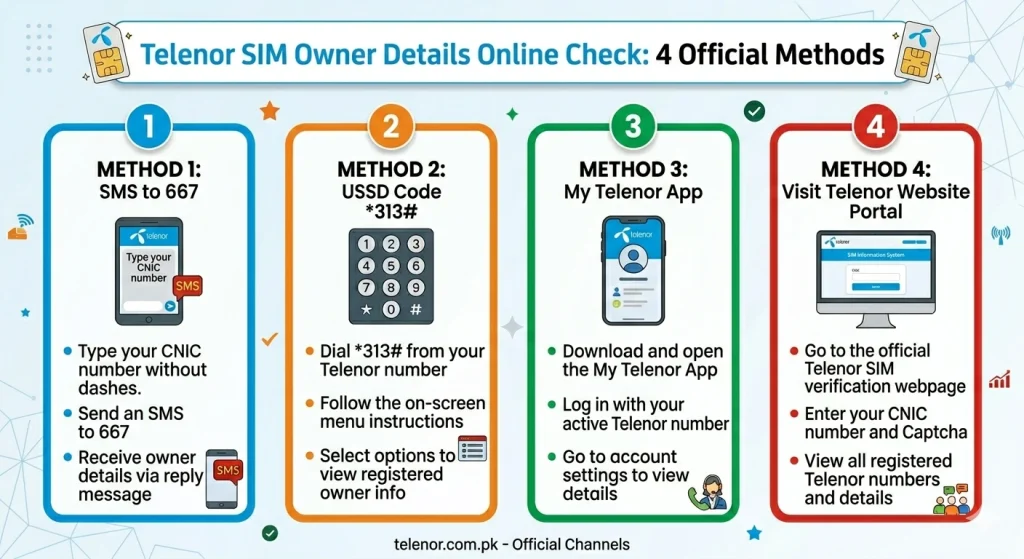
Which Method Is Best for You?
What Information Can You Actually See?
A lot of people expect to see full details like home address, date of birth, and complete CNIC. That is not how it works in Pakistan anymore. Here is what you will actually get when you do a Telenor SIM information check:
Visible information:
- Network name (Telenor, Jazz, Zong, Ufone)
- Number of SIMs per network
- Total SIM count on the CNIC
- Partial or masked CNIC number
Hidden for privacy:
- Full home address
- Complete CNIC digits
- Date of birth
- Parent or family information
This balance exists so that users can verify their own data while strangers cannot misuse personal information.
Final Thoughts
Checking Telenor SIM owner details is easier than most people think, but it comes with rules. The safest, fastest, and most trusted way is the PTA 668 SMS service, followed by the My Telenor app and official franchise visits. Stay away from random websites that promise full personal information of other people because they are usually scams or illegal.
Knowing your SIM registration status is a small habit that can save you from big problems like identity theft, fraud, or unwanted legal trouble. Take five minutes today, send that SMS to 668, and make sure everything under your name is truly yours.
Frequently Asked Questions
No, you cannot get the full name of another person just by entering their number. PTA only allows you to check SIMs registered on your own CNIC through the 668 service.
Yes, sending a message to 668 is completely free from any network in Pakistan, including Telenor.
One person can register a limited number of SIMs on their CNIC across all networks. The PTA limit is usually 5 in total, but this can change, so always check the latest PTA update.
Go to the nearest Telenor franchise with your original CNIC and ask them to block the unknown SIMs. You can also report it on the PTA complaint website.
Yes, the 668 SMS service works without internet. You only need basic mobile signal to send the SMS.