
How Many SIMs Are Registered on a CNIC in Pakistan?
In Pakistan, your CNIC (Computerized National Identity Card) is used for almost everything. You need it to open a bank account, get a passport and even buy a SIM card. But here is something many people do not think about: someone might have already registered a SIM on your CNIC without telling you.
This is not a small issue. If extra SIMs are registered on your CNIC and someone uses them for fraud, illegal calls, or scams, you could be in serious trouble — even if you never used those SIMs yourself.
What Does "SIM Registered on CNIC" Mean?
When you buy a new SIM card in Pakistan, the mobile network company — like Jazz, Telenor, Zong, Ufone, or SCOM — takes your CNIC number and biometric (fingerprint) data. They then link that SIM to your CNIC. This process is called SIM registration.
So when someone asks "how many SIMs are registered on my CNIC," they are asking how many mobile numbers have been connected to their identity card.
Every registered SIM is linked to a real person's CNIC. This rule was made by the Pakistan Telecommunication Authority (PTA) to stop crime, terrorism and fraud. PTA is the government body that controls all mobile networks in Pakistan.
How Many SIMs Can Be Registered on One CNIC in Pakistan?
This is one of the most searched questions, and the answer is clear. According to PTA rules updated in 2026, one CNIC can have a maximum of 5 SIM cards registered across all mobile networks combined.
Here is a simple per-network breakdown:
| Mobile Network | Max SIMs Per CNIC | Network Type |
|---|---|---|
| Jazz (Mobilink) | 5 SIMs | GSM / 4G LTE |
| Telenor Pakistan | 5 SIMs | GSM / 4G LTE |
| Zong (CMPAK) | 5 SIMs | GSM / 4G LTE / 5G |
| Ufone (PTCL) | 5 SIMs | GSM / 4G LTE |
| SCO (SCOM) | 5 SIMs | GSM / AJK & GB Only |
| Total (All Networks) | 5 SIMs Combined | PTA Policy Limit |
Some networks allow up to 5 per network but the total limit across all networks is also 5. This means you cannot have 5 SIMs on Jazz and 5 more on Telenor. The combined limit is 5 SIMs on your CNIC, no matter how many networks you use.
Important Update: In earlier years, the limit was higher. PTA reduced the limit to fight cybercrime, SIM fraud, and fake account activity. The current rule as of 2026 is a maximum of 5 SIMs per CNIC in total.
How to Do a SIM Register Check on Your CNIC
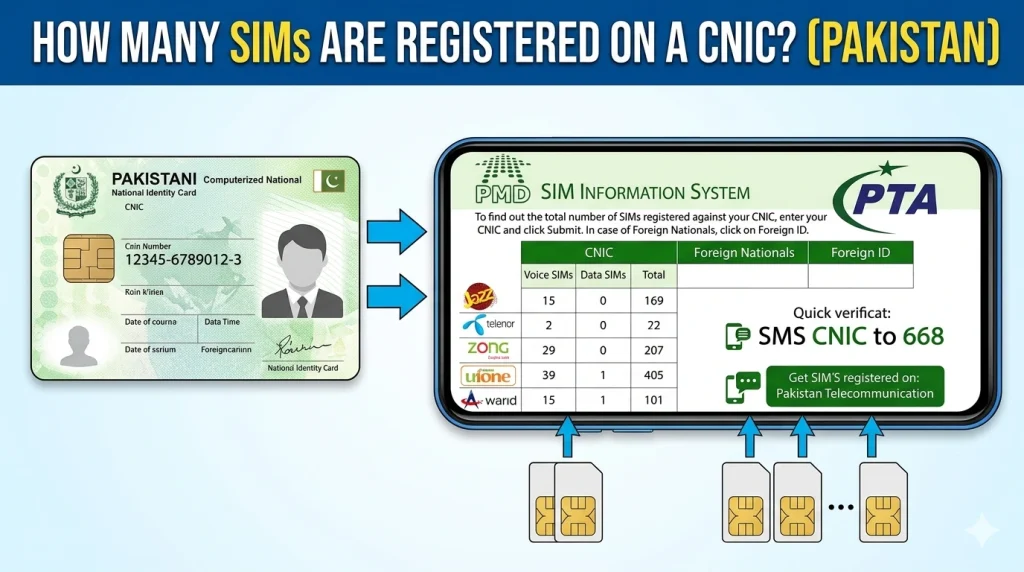
Checking how many SIMs are registered on your CNIC is very easy and completely free. You can also check full SIM owner details for any number registered on your identity card. PTA gives you multiple ways to do this — no office visit or payment required.
This is the fastest method. Just follow these steps:
- 1Pick up your phone and open the SMS app.
- 2Type your full CNIC number without dashes. For example:
3520112345678 - 3Send this SMS to
668. - 4Wait a few seconds. You will get a reply from PTA.
- 5The reply will show all SIMs currently registered on your CNIC.
PTA has an online tool called the Device Identification, Registration and Blocking System (DIRBS). You can use the SIM Information System on this website to check your registered SIMs.
- 1Open your browser and go to: pta.gov.pk
- 2Look for the option labeled "SIM Information System" or "Check SIMs on CNIC."
- 3Enter your CNIC number in the box.
- 4Complete the CAPTCHA verification to prove you are a real person.
- 5Click the Check button.
- 6The system will show all SIMs linked to your CNIC along with the network name.
If you are not comfortable using SMS or the internet, you can call the PTA helpline directly.
Tell them your CNIC number and ask them to check how many SIMs are registered. They will also guide you if you want to block any unauthorized number.
You can also walk into any Jazz, Telenor, Zong, or Ufone service center. Bring your original CNIC and ask them to check how many SIMs are active on your ID card. They can also block any SIM you did not register yourself.
Why Does SIM Register Failed Happen? (Reasons & Solutions)
Sometimes when you try to register a new SIM you get an error message. This is called a SIM register failed error. It can be very frustrating especially when you urgently need a new number.
Here are the most common reasons why SIM registration fails and what you can do:
| Reason for Failure | What It Means | What to Do |
|---|---|---|
|
CNIC Limit Reached
|
You already have 5 SIMs on your CNIC | Block an old SIM first, then register a new one |
|
Biometric Mismatch
|
Your fingerprint did not match NADRA records | Visit the nearest NADRA office to update your biometrics |
|
Expired CNIC
|
Your identity card is expired | Renew your CNIC at NADRA before getting a new SIM |
|
CNIC Blocked by NADRA
|
Your CNIC is flagged or suspended | Visit NADRA office to resolve the issue |
|
Network System Error
|
Technical issue on the mobile network side | Try again after a few hours or visit the service center |
|
Wrong CNIC Number
|
The retailer entered an incorrect CNIC number | Double-check your CNIC digits with the retailer |
|
Retailer Biometric Device Error
|
The fingerprint scanner is not working | Ask the retailer to use a different scanner or visit a company service center |
If your SIM register keeps failing and none of the above reasons apply, go directly to the nearest customer service center of the mobile network. They have better tools to solve the problem and can check your CNIC status directly with NADRA.
How to Block Extra or Unknown SIMs on Your CNIC
If your SIM register check shows SIMs that you did not sign up for, take action right away. Someone may have registered those SIMs using your CNIC without your knowledge. This is illegal and you have the right to block them.
- 1Send an SMS to
668with your CNIC number to first check all registered SIMs. - 2If you see any unknown SIM, note down the number and network name.
- 3Reply to PTA or follow their instructions to report and block the SIM.
- 1Visit the nearest service center of the network where the unknown SIM is registered.
- 2Bring your original CNIC.
- 3Tell them the SIM was registered without your consent.
- 4They will verify your identity and deactivate the SIM immediately.
Option 3: File a Complaint with PTA
If the network does not help, file a complaint directly with PTA at their official website or call their helpline at 0800-55055. PTA has the authority to force any mobile network to block illegal SIMs.
PTA SIM Registration Rules in Pakistan (2026 Updated Guidelines)
Pakistan's SIM registration rules have changed over the years. The current rules as of 2026 are stricter than before. Here is a clear summary:
- Maximum 5 SIMs allowed on one CNIC across all networks.
- Every SIM must be registered using biometric verification (fingerprint).
- SIM registration is only allowed at official company sales points and franchise shops.
- Retailers must use PTA-approved biometric devices.
- No SIM can be activated without a valid and unexpired CNIC.
- Foreigners can register SIMs on their Passport or NICOP (National Identity Card for Overseas Pakistanis).
- Selling or transferring a SIM to another person requires CNIC and biometric re-verification.
- SIMs not used for more than 90 days can be blocked by the network automatically.
Note: NADRA (National Database and Registration Authority) verifies all biometric data used during SIM registration. If your fingerprints are not updated in the NADRA database, SIM registration may fail.
What Are the Legal Penalties for Illegal SIM Registration in Pakistan?
Many people do not realize how serious illegal SIM registration is. Under the Prevention of Electronic Crimes Act (PECA) 2016 and PTA regulations, getting a SIM registered on someone else's CNIC without their knowledge is a criminal offense.
Here are the possible legal consequences:
| Offense | Penalty Under Pakistan Law |
|---|---|
| Registering a SIM on someone's CNIC without consent | Up to 3 years in prison and/or fine |
| Using a fraudulently registered SIM for crime | Up to 7 years in prison |
| Retailer allowing fake SIM registration | License cancellation + heavy fine |
| Using a SIM for harassment or threats | Up to 1 year in prison under PECA |
| SIM-based financial fraud | Up to 7 years + compensation to victim |
This is why it is so important to check your CNIC SIMs regularly. If someone is committing a crime using a SIM on your CNIC, the police can trace it back to you first.
Conclusion
Knowing how many SIMs are registered on your CNIC is not just useful. It is important for your safety and legal protection. Pakistan's PTA has made it very easy to do a SIM register check for free.
Whether it is identity theft, SIM swap fraud, or someone using your name for illegal activity, staying informed is your best defense.
Quick Check: Open your SMS app, type your CNIC number without dashes and send it to 668. PTA will reply with all SIMs registered on your identity card — completely free.
Frequently Asked Questions (FAQs)
668 and you will see all active SIMs on your ID card.
668 does not cost you anything at all. PTA has made this a free public service so that every Pakistani citizen can protect their identity easily.