
Live Tracker Pak Sim Data: Check & Protect Your SIM 2026
Many people look for live SIM tracker data. They want to know if a SIM card can be tracked in real-time in Pakistan and whether it is legal.
In this article, we explain live SIM tracker data online 2026 for learning and information only so people don’t get tricked by fake websites or illegal claims.
What Is Live Tracker Pak SIM Data?
Live Tracker Pak SIM Data means checking which mobile phone SIM cards are registered under your name (CNIC number). Think of it like checking your school attendance sheet – you want to see if your name is marked correctly.
In Pakistan every SIM card must be registered with someone’s CNIC. Sometimes bad people use other people’s CNIC to register SIM cards without permission. That is why you need to check regularly!
Why Should You Care?
- Someone might have registered a SIM on your CNIC without telling you
- You can only have 5 SIMs maximum on your CNIC
- Criminals sometimes steal CNIC copies to get illegal SIMs
- You could get in trouble for something you didn’t do
Why Should You Check SIM Owner Details?
When you buy a SIM card in Pakistan, the mobile company (like Jazz, Telenor, Zong or Ufone) they asks for your CNIC. They send this information to PTA (Pakistan Telecommunication Authority). PTA keeps a big database like a huge notebook – that shows:
- Your CNIC number
- Which SIMs are registered under it
- Which mobile company provided each SIM
- When the SIM was registered
Official Legal Methods to Check Your SIM Data
When you buy a SIM card in Pakistan, the mobile company (like Jazz, Telenor, Zong or Ufone) they asks for your CNIC. They send this information to PTA (Pakistan Telecommunication Authority). PTA keeps a big database like a huge notebook – that shows:
- Your CNIC number
- Which SIMs are registered under it
- Which mobile company provided each SIM
- When the SIM was registered
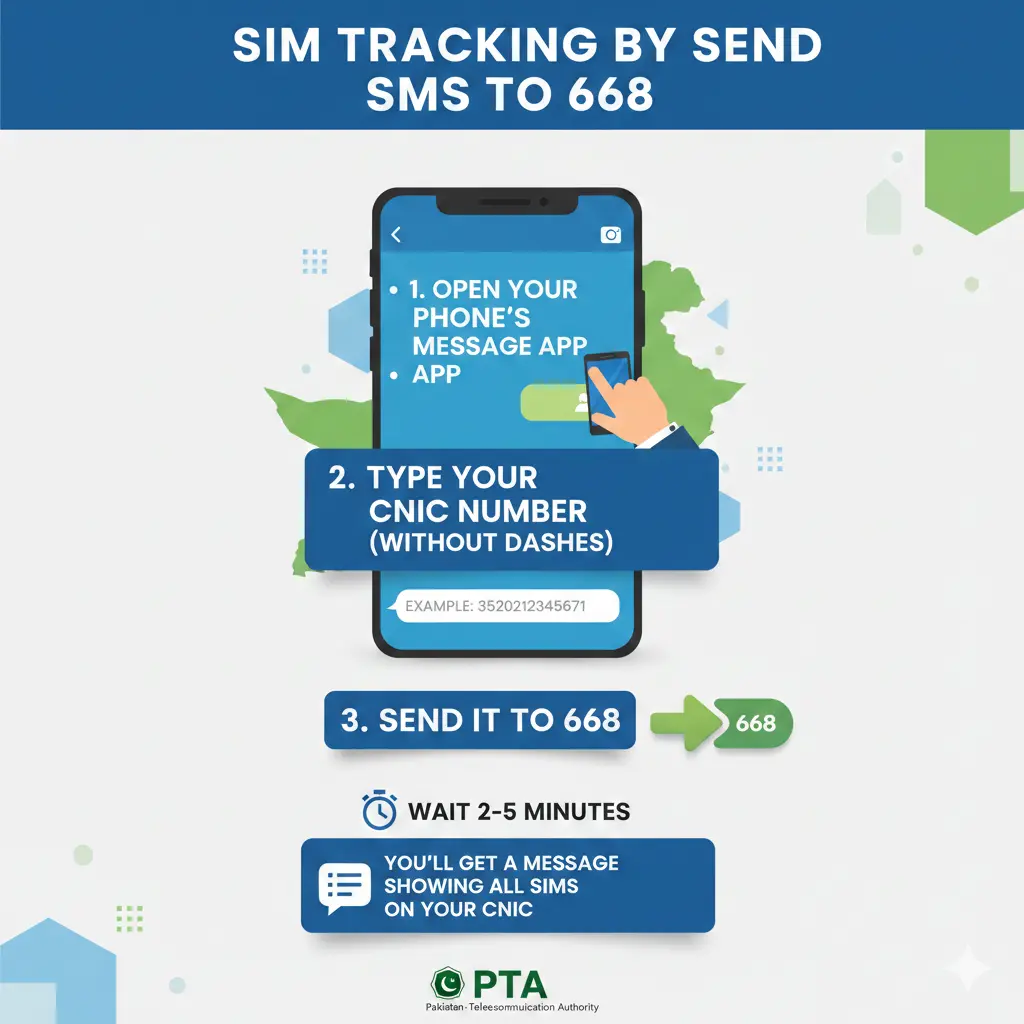
Method 1: Send SMS to 668
Step-by-Step Instructions:
- Open your phone’s message app
- Type your CNIC number (without dashes)
- Example: 3520212345671
- Send it to 668
- Wait 2-5 minutes
- You’ll get a message showing all SIMs on your CNIC
Aslo Check: NADRA SIM Owner Details Kya Hoti Hain?
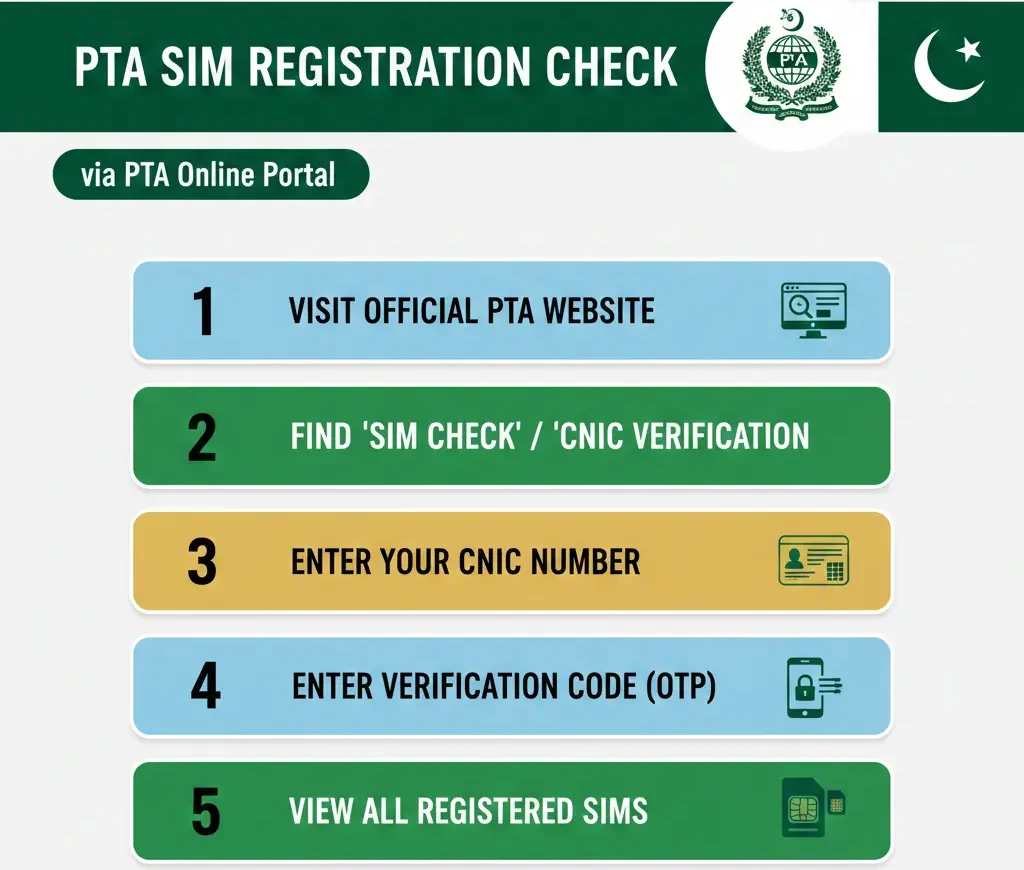
Method 2: Online Portal (CNIC.SIMS.PK)
Steps:
- Visit the official PTA website
- Look for “SIM Check” or “CNIC Verification”
- Enter your CNIC number
- Enter verification code (OTP) sent to your phone
- See all your registered SIMs
Method 3: Visit Mobile Network Office
Go to any Jazz, Telenor, Zong, or Ufone franchise:
- Take your original CNIC
- Ask them to check SIMs on your CNIC
- They will print a list for you
- This service is FREE
Required Information to Check SIM Data
| What You Need | Why You Need It |
|---|---|
| Your CNIC Number | To identify your records |
| Active Phone Number | To receive verification code |
| Original CNIC Card | For in-person verification |
| Fingerprint (sometimes) | For biometric verification at office |
Understanding the 5-SIM Limit Rule
In Pakistan, one person can only have 5 active SIMs on their CNIC. Also you can check the sim details by using PTA Website.
Why This Rule Exists:
- Stops criminals from getting too many SIMs
- Prevents SIM card misuse
- Helps police track illegal activities
- Protects your identity
What If You Need More Than 5 SIMs?
You cannot get more than 5 SIMs legally. If you need SIMs for business:
- Register your company
- Get SIMs under company name
- Use family members’ CNICs (with permission)
Common SIM Fraud Problems in Pakistan
- 1. SIM Swap Fraud
- Criminals pretend to be you
- They tell mobile company your SIM is lost
- Company gives them a new SIM with your number
- They access your bank accounts and social media
- 2. Illegal CNIC Registration
- Someone uses photocopy of your CNIC
- They register SIMs without asking you
- These SIMs might be used for crimes
- Police might question you
- 3. Social Engineering Attacks
- Scammers call pretending to be from bank or mobile company
- They ask for your personal details
- They use this information to harm you
How to Block Unauthorized SIMs
Found a SIM you didn’t register? Do this NOW:
Step 1: Call Your Network Provider
| Network | Helpline Number |
|---|---|
| Jazz | 111 (from Jazz) or 0300-0000-111 |
| Telenor | 345 (from Telenor) or 0345-0000-345 |
| Zong | 310 (from Zong) or 0310-0000-310 |
| Ufone | 333 (from Ufone) or 0333-3000-333 |
Step 2: Visit PTA Office
- Go to nearest PTA office
- File a written complaint
- They will investigate and block the SIM
Step 3: Report to FIA Cyber Crime
- Call: 1991
- Website: complaints.fia.gov.pk
- They handle serious fraud cases
Benefits of Regular SIM Tracking
1. Know What’s On Your Name
- You always know which SIMs belong to you
- No surprises from police or authorities
- Peace of mind
2. Catch Fraud Early
- Spot unauthorized SIMs quickly
- Stop criminals before they cause damage
- Protect your money and identity
3. Stay Within Legal Limits
- Make sure you don’t cross 5-SIM limit
- Avoid fines and penalties
- Stay on right side of law
Family Protection Benefits
- Check Parents’ CNICs
- Old people are easy targets for fraud
- Help them check their SIMs monthly
- Block unauthorized SIMs for them
- Monitor Children’s SIMs
- Know which SIMs your kids have
- Keep them safe from bad people
- Control their mobile usage
What Information Can You Legally Check?
About Your Own CNIC (100% Legal)
- Which SIMs are on your CNIC
- When SIMs were registered
- Which network each SIM belongs to
- How many SIMs you have
our SIM registration history
About Family Members (Need Their Permission)
- Parents’ SIMs (if they give permission)
- Children’s SIMs (if they’re minors)
- Spouse’s SIMs (with their consent)
Reporting Fraud and Harassment
FIA Cyber Crime Wing (For Internet Crimes)
- Helpline: 1991
- Website: complaints.fia.gov.pk
- Email: complaint@fia.gov.pk
- For: Online fraud, identity theft, cyber harassment
Pakistan Telecommunication Authority (For SIM Issues)
- Helpline: 0800-55-055
- Website: pta.gov.pk
- For: Unauthorized SIMs, network complaints, registration issues
Police (For Criminal Matters)
- Emergency: 15
- Non-Emergency: Visit nearest police station
- For: CNIC theft, serious fraud, threats
Emergency Quick Reference Card
| Emergency Number / Action | Check / Call |
|---|---|
| Check My SIMs | Send CNIC to 668 |
| Block Lost SIM (Jazz) | Call 111 |
| Block Lost SIM (Telenor) | Call 345 |
| Block Lost SIM (Zong) | Call 310 |
| Block Lost SIM (Ufone) | Call 333 |
| Report Cyber Crime | Call 1991 |
| PTA Helpline | 0800-55-055 |
| Police Emergency | 15 |
| Lost CNIC Report | Nearest Police Station |
Network-Specific Security Features
Jazz Security Services
- SIM Lock: Dial *786# to enable
- Number Protection: Call 111 to activate
- Fraud Alert: Automatic SMS for suspicious activity
Telenor Protection
- SIM Security: Dial *999# for options
- Anti-Theft: Register device IMEI online
- 24/7 Support: Call 345 anytime
Zong Safety Features
- SIM Block Service: SMS BLOCK to 310
- Number Verify: Check original owner at franchise
- Security PIN: Set PIN for SIM changes
Ufone Security Options
- PIN Protection: Call 333 to set up
- Lost SIM Service: Block within minutes
- Fraud Prevention: Free alerts for unusual activity
Final Thoughts
Live tracker SIM data” is a highly searched keyword but there are many misconceptions associated with it. In Pakistan live SIM tracking can only be carried out by authorized institutions.
If you want correct and legal information always:
Follow PTA guidelines
Stay away from fake tracking tools
Rely on awareness-based and informational content
FAQS
Is sending SMS to 668 really free?
Yes It is completely free. PTA doesn’t charge anything. Your network also doesn’t charge for this service.
How often should I check my SIMs?
Once a month is perfect. Set a reminder on your phone for the same date every month.
Can I check my wife's or husband's SIM?
Only with their permission You need their consent and they should be present when checking.
Is there any website to track SIM location?
No legal website exists for tracking someone else’s SIM location. If someone offers this it is a scam.